Quantcast
Channel: Andrej Baranovskij Blog
Viewing all 743 articles
Browse latest View live

List View - Cool Looking ADF PS6 Component for Collections

$
0
0
I'm very excited about ADF PS6 release, it brings new freshness and coolness feeling to ADF. ADF Faces runtime performance seems to be incomparable faster and much more responsive comparing to previous ADF 11g R1 and even ADF 11g R2 releases. This gives good hopes to expect the same improvements in ADF 12c. There is new ADF Faces component introduced - List View. You can think about it as about much more liberal ADF Faces table component. List View renders data collections but there is much more control and flexibility how data collection is presented visually. If you need to render strict tabular data - ADF Faces table is the most suitable, List View is for something less structured. We could achieve up till now similar layout as List View with custom implementation using ADF Faces iterators or for each tags. Of course it is much easier now to use out of the box List View tag - Displaying a Collection in a List.

Here you can see fragment structure for my sample application with List View usage - ListViewApp.zip:


There are two types of List View implemented here - simple and hierarchical one. Simple List View renders collection in a list, there is option to load more rows from the collection on demand. Hierarchical List View renders Department - Employees master detail data:


Simple list is configured with the same property values as regular ADF Faces table:


Collection row is rendered within List View using List Item tag - this is where actual output or input ADF Faces component is implemented:


List View with editable popup functionality - launched from Edit button. Edited data is synchronized with data rendered in List View immediately:


Hierarchical List View is configured with the same properties as regular ADF Faces tree would be configured - pointing to treeModel instead of collectionModel as for the ADF Faces table. There is groupHeaderStamp facet - it allows to render data grouping:


Second level data is rendered under List Item tag:


In the page definition, there is regular tree collection definition as usual:


Hierarchical List View provides really good view of hierarchical data and it renders fast. Here viewing employees by departments:


One more small thing: I noticed in PS6 after session timeout - screen becomes black, looks good:


How To Control ADF Table Pagination on Runtime and Do Case Insensitive Search

$
0
0
I decided to update my sample app from previous post - ADF 11g PS6 - ADF 10g Table Pagination Feature is Back Finally with option to change page size dynamically on runtime. Change between scroll and page mode is implemented, plus case insensitive table column filter option is enabled. Updated sample - TablePaginationApp_v3.zip comes with choice list to select page size:


There is button to force page size change, it calls af:setPropertyListener:


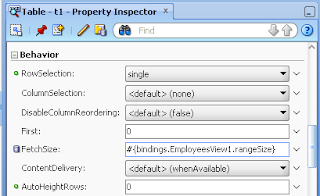
Listener is copying selected page size from choice list and sets Range Size in table iterator. Table Fetch Size by default is set to be equal iterator Range Size - this is how we can change dynamically table page size:


FetchSize is equal table iterator Range Size:


Switch between scroll and page modes is implemented in backing bean - changing scroll policy and doing surrounding panel collection PPR:


By default, when table is loaded - 10 rows are displayed:


You can change to 25 rows:


Switch between scroll and page modes from panel collection menu:


Rendering scroll mode now - no option to change page size, all rows are displayed:


This is how we can control table layout.

Let's see how column case insensitive search works - this is just one property change for the af:column tag. Try to search for First Name - "steven":


There will be no results - by default case sensitive search is executed in ADF table:


How to enable case insensitive search for af:column - easy. Select af:column you want to apply case insensitive search:


Set "caseInsensitive" for FilterFeatures property of af:column:


Search again for "steven" - this time result is available:


Multiple Files Upload - Unlimited Files Upload in ADF 11g PS6

$
0
0
Among other new components and features available in ADF 11g PS6 - there is one very important. File Upload ADF Faces component was upgraded to support multiple or basically infinite file upload. This is good to see how ADF framework is progressing with each new release, this is another argument why you should use ADF.

I was using sample application - MultipleFileUpload.zip, to test how multiple file upload works. You drag and drop regular ADF Faces input file component:


There is option to set number of rows (number of files in other words) to be rendered by input file component (this number can be changed dynamically on runtime):


Another property that must be set - MaximumFiles. With this property you can specify maximum number of files to be uploaded at once (also can be changed dynamically on runtime):


This is about UI part. Now how to handle multiple files and how to get Input Stream. You can create Action Listener for Upload button and handle multiple files input from such listener:


Important part - if you plan to allow multiple files upload, you should bind ADF Faces input file component the List. In such way, we have access to collection of files user is uploading:


Lastly don't forget to set UsesUpload=true property as usual for the container JSF page on af:form tag:


Set UsesUpload=true property for af:form:


Here how it looks on ADF UI - multiple files are submitted to be uploaded (even file upload progress bar is rendered while file is being loaded):


Status on the server informs about successful multiple files upload:


BPM 11g R1 Worklist Integration (Hacking Experiment) Into Non-SOA ADF 11g R2 Domain

$
0
0
We all know there are no Oracle SOA/BPM available for ADF 11g R2 platform. In practice it happens to run both environments in parallel - Oracle SOA/BPM 11g R1 for process applications and ADF 11g R2 for ADF applications. Obvious question in such situations - how to access BPM 11g R1 Worklist application from ADF 11g R2 context? Well, this is possible - I will describe in this post how it can be done with some hacks. Keep in mind that officially it is not supported to access BPM 11g R1 Worklist from ADF 11g R2 environment, but if there is such requirement it can be achieved. Previously I was explaining how to run BPM 11g R1 Worklist and Human Task on Non-SOA 11g R1 domain - Running Oracle BPM 11g PS5 Worklist Task Flow and Human Task Form on Non-SOA Domain, today we go one step further and use newer ADF version for Non-SOA domain. But you should know that BPM Worklist is ADF application and really it can run well in ADF 11g R2 context. There are no SOA/BPM libraries for ADF 11g R2 installation, but this is not the issue - we can add and reference SOA/BPM libraries from different 11g R1 domain. There is no need to install complete SOA/BPM 11g R1 domain on that machine where ADF 11g R2 runs - you can copy SOA/BPM libraries package only.

Usually we don't want to deploy and run ADF related applications on the same domain where SOA/BPM is installed. Often ADF and SOA/BPM development is out of synch, this is when we need to make different BPM/SOA and ADF versions talk together.

Here you can download sample application for today post - adf11gr2_bpm.zip. This sample is based on two JDeveloper applications. IntegratedBPMWorklistApp - ADF 11g R2 application with integrated ADF 11g R1 BPM Worklist. EmployeeManagementLab - ADF 11g R1 Human Task ADF UI migrated to ADF 11g R2. BPM process - EmployeeManagement you can download from my previous post - Generic ADF 11g Human Task Handler Concept for Oracle BPM.


Visually this integration between SOA/BPM 11g R1 and ADF 11g R2 looks like this:


BPM process is deployed on SOA/BPM 11g R1 domain. Custom ADF application includes BPM Worklist ADF 11g R1 task flow and runs on ADF 11g R2 domain.

ADF 11g R2 application with integrated BPM Worklist ADF 11g R1 task flow:


Human Task ADF application generated with ADF 11g R1 and migrated to ADF 11g R2 runs on ADF 11g R2 domain:


The same ADF 11g R2 application renders custom ADF screens:


When Human Task is deployed on ADF 11g R2 domain, from the log we can see successful Human Task initialization and registration:


BPM process running on SOA/BPM 11g R1 domain points Human Task URL's to ADF 11g R2 domain:


BPM Worklist task flow is added into ADF 11g R2 custom application and is configured to run in worklist mode. At the end of the day BPM Worklist is ADF 11g R1 application with usage of some additional SOA/BPM libraries - it runs well in ADF 11g R2 context:


Make sure you don't forget to add ADF security permissions for BPM ADF task flows:


Worklist Components tag must be registered - pay attention, it points to the library from SOA/BPM 11g R1 domain.:


There are worklist and task list libraries added into ADF 11g R2 application from SOA/BPM 11g R1 domain:


Shared library - oracle.soa.workflow.wc is installed on ADF 11g R2 domain and must be referenced by custom ADF application with integrated BPM worklist:


You should install on ADF 11g R2 domain 2 worklist related libraries and make sure that WebService Policy Manager library is installed (is needed to communicated to BPM domain securely):


Add Foreign JNDI Provider pointing to the SOA/BPM 11g R1 domain (read more about this from my previous post):


Both applications - custom ADF 11g R2 with BPM Worklist and Human Task are deployed on the same ADF 11g R2 domain:


Ok, we are done with BPM Worklist part.

Let's take a look now into Human Task ADF implementation part ready to run on ADF 11g R2 domain. I simply migrated Human Task application to ADF 11g R2 by opening it in JDeveloper 11g R2:


JSF library is not migrated automatically. You need to remove JSF 1.2 and add JSF 2.0 library manually:


BPM Worklist libraries are added only for compilation, these two libraries are not not deployed:


Configuring ADF 11g R2 environment to run BPM Worklist from 11g R1 is not an easy task, but is doable based on my hacking experiment.

Oracle BPM 11g Mobile Worklist with ADF Mobile

$
0
0
I have developed ADF Mobile application to bring BPM worklist tasks to the mobile device - I would like to share concepts of such ADF Mobile application with the community. The whole idea is based on BPM Java API to access BPM Context and get currently assigned tasks for the user, read more here - Lightweight ADF Task Flow for BPM Human Tasks Overview. Once tasks from BPM are queried, they are exposed through ADF BC secured Web Service method. Web Service is consumed from ADF Mobile application through Web Service Data Control - task data is rendered on the mobile device, later user can do callback and send approve/reject actions. Approve/Reject actions will be processed by BPM API on ADF BC secured Web Service side.

ADF Mobile login and secured Web Service call implementation is done based on previous blog - ADF Mobile - Secured Web Service Access.

Here you can see BPM mobile worklist solution high level architecture:


Sample application - BPMMobileWorkListApp.zip, is shipped with three separate JDeveloper applications:

1. ADFBasicAuthApp - server side application to allow login into ADF Mobile application running on the mobile device

2. ADFSecuredService - server side application with access to BPM context and exposed secured Web Service providing list of tasks for the current user

3. ADFMobileSecuredApp - ADF Mobile application with connection to secured ADF BC Web Service, displays BPM mobile worklist

User is provided with login screen for BPM mobile worklist application:


Here we can see standard ADF Worklist task flow running in the Web browser with BPM tasks listed. The same tasks are listed in BPM mobile worklist:


In BPM mobile worklist user can select particular task and view details:


1. ADF BC secured Web Service Implementation

ADF BC secured Web Service is implemented and deployed based on this post - Web Service Interface for ADF BC Application Module in Oracle Fusion 11g.

Web Service method returns List type, each task data is represented with one line in the list. Method is exposed through ADF BC Web Service, return type - List:


Connection to BPM context is established with the username retrieved from ADF Security context, password is static for the simplicity of the example:


Sample application contains logic to access BPM context and retrieve all pending tasks for current user. Tasks are collected and returned as List:


Such Web Service can be tested from Oracle Enterprise Manager, using OWSM policy for secured access. See list of task data returned:


2. ADF Mobile application for BPM mobile worklist

Secured Web Service is consumed in ADF Mobile and Data Control is created:


Data is loaded into mobile device screen through proxy Data Control bean - WorkList, in this bean we do parsing of Web Service data retrieved from MobileService Data Control:


Here is the source code for BPM mobile worklist screen - list of tasks:


Screen to display details of BPM task in ADF Mobile:

ADF 11g PS6 Table Pagination and Displaying Selected Row Issue

$
0
0
There was a post about new ADF 11g PS6 feature Table Pagination - ADF 11g PS6 - ADF 10g Table Pagination Feature is Back Finally. I had a question from the reader in the comments, about displaying selected row from the page range other than the first. Reader was saying this doesn't work, indeed I tested it with sample application and it doesn't seem to work. If you plan to implement such use case where display of selected row is important, keep in mind there are related issue in ADF UI table pagination. I will describe them below.

Sample application - TablePaginationApp_v4.zip, contains ADF task flow with two fragments. Single row is selected in the first fragment and we try to display the same row in the table from second fragment:


I will show you first how it works by default. Table is set to display 10 rows per page and we navigate to some row in the next page range:


Press Show Employees button to navigate to the table. Table displays first page range, there is no selected row shown:


You can select manually second page range - you will find selected row there:


This is what blog reader explains in his comment - current row is not displayed.

Let's try to apply one trick and see if it works - DisplayRow = selected for ADF table component:


We test now the same thing - navigate to table of Employees with row selected in other than first range page:


Selected row is displayed now, required page range is loaded automatically from the beginning:


But there is another problem now - you are locked in into current page range. Try to press other range page number, it will be changed - but not data, data remains the same and insist to show selected row:


It seems like we can use table pagination only for such use cases, when there is no need to automatically display selected row. At least until workaround is found.

Master-Detail ADF BC Web Service for ADF Mobile

$
0
0
It seems like a bit unclear for the developers if ADF BC Master-Detail relationship can be reused out of the box through ADF BC Web Service in ADF Mobile. Short answer - yes, it can. In order to prove this I have developed sample application - second level Master-Detail relationship is exposed through ADF BC Web Service and consumed from ADF Mobile screens.

Mobile device in the first screen renders list of departments, second screen brings all employees from selected department and finally third screen brings subordinate employees (managed by). Here is ADF Mobile Task Flow implementation:


Here you can download adfmdmobilews.zip sample application, it contains both parts - server side and mobile client.

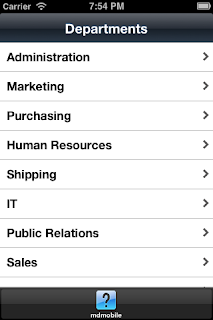
First screen brings all departments:


Second screen displays list of employees for selected department, first Master-Detail:


Third screen displays list of subordinates, employees managed by selected employee, second Master-Detail:


ADF BC server side is implemented to support classical ADF BC Master-Detail relationship defined with View Links and registered in Application Module:


ADF BC Web Service is exposed with Master VO instance - DepartmentsView1. This instance is enabled with View Criteria (just to bring entire list of departments), empty parameter values for the View Criteria are accepted:


Something very important now. Based on documentation - 11.2.6 How to Support Nested Processing in Service-Enabled Master-Detail View Objects, you must set SERVICE_PROCESS_CHILDREN property on View Link for the Master-Detail relationship be enabled for ADF BC Web Service. I did this for Department-Employees View Link:


As well as for Employee-Subordinates View Link:


This is about the server side, now we switch to ADF Mobile client. You should know that ADF Mobile client Web Service Data Control is stateless (different from regular ADF BC Data Control), this means current row selection is not preserved when moving from one ADF Mobile page to another. For the Master-Detail relationship to work on ADF Mobile client, we must transfer current Master record key between pages, in Page Flow Scope as for example:


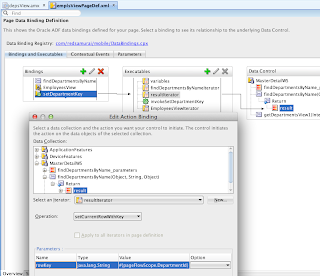
We can drag and drop Master-Detail relationship from Data Control as usual in ADF. Here how we can set correct Master key for Detail relationship:


Data Control method - setCurrentRowWithKey is invoked in the second page (detail for Employees based on Department). We are using old good method from ADF 10g times - invokeAction, in order to call executable method on page load:


The same for the third page, where second level detail is implemented for subordinates. Here we call two methods for setCurrentRowWithKey, one for Departments and second for current manager Employee:


Keep in mind that by default setCurrentRowWithKey will not work, because ADF Mobile Web Service Data Control doesn't inherit key setup from ADF BC. You need to set key attribute for each of Data Control bindings manually, from DataControls.dcx go and edit required binding:


JDeveloper generates definition XML file for the binding, you can set proper key. Even it still displays old key and there is no way to remove it, on runtime only proper key is used:


Key is set manually for Employees binding as well:

Webinar: ADF Master Class and ADF Blog Q&A, Andrejus Baranovskis (Part I)

$
0
0
I was blogging about ADF for 7 years already, long period. I feel this is a right time to bring it to the next level and have live technical ADF Q&A discussion with blog readers. My idea is to organize live ADF call with you - blog readers, we can repeat similar format session later as well - depends how it goes.

Webinar is scheduled for 2 hours at 7 PM (Central Europe time) on May 14th. Number of virtual seats is limited, registration is done on first come first serve basis. Webinar registration link: ADF Master Class and ADF Blog Q&A, Andrejus Baranovskis (Part I), Tue, May 14, 2013 7:00 PM - 9:00 PM CEST.

I will be ready with predefined agenda, but we can go off and speak about any ADF related questions. Predefined agenda for this call:

1. CRUD and LOV performance and validation improvement tricks

2. Conditional validation in ADF BC, Entity Cache and View Object Instances

3. ADF Table pagination, List View components

4. ADF Mobile login, secured ADF BC Web Services and on-device database access


Very excited to speak to you - blog readers, let's meet on May 14th at 7 PM (CET).

Duplicate Validation Error Message and ADF Bindings

$
0
0
One of the bug requests I was fixing during this week was related to duplicate validation error message display on ADF UI. This was quite annoying to the users - the same validation error message displayed twice:


There was nothing special about this validation rule, as any other validation rule defined on ADF BC Entity Object:


I noticed something strange in Page Definition file. As per screenshot above, ADF UI renders only table component. However, in Page Definition file table binding was defined along with attribute binding for the Salary attribute:


Salary in the table is rendered from table binding, and as additionally we have attribute binding for the same element, this is causing the same validation error message reported twice (one for Salary in the table binding and another for Salary attribute binding):


Make sure not to leave duplicate bindings for the same attributes:


It reports only one validation error message, as expected:

Here you can download sample application with duplicate validation error message, try to fix it as described in this post - ADFValidationErrorApp.zip.

JDeveloper 11g (11.1.2.4.0) Startup Mystery - JDK 1.6.0_24 Not Supported (1.6.0_35 Required)

$
0
0
New JDeveloper 11g (11.1.2.4.0) on Windows fails to start with embarrassing error after fresh installation, this is known issue and Oracle is fixing it. Seems like Oracle engineers missed it and released JDeveloper 11g (11.1.2.4) with wrong JDK. Once you install JDeveloper 11g (11.1.2.4.0) and try to start it, JDK error is reported - Java version 1.6.0_24 not supported. The minimum version required is 1.6.0_35 and JDEV startup stops, basically unusable:


If you go and check installation contents for JDeveloper 11g (11.1.2.4.0), you will see only JDK 1.6.0_24 packaged. This looks like a mistake to me:


Workaround (until Oracle will fix it in JDeveloper 11g (11.1.2.4.0)) is to install required JDK 1.6.0_35 manually by yourself and point it during JDEV startup:


With manually installed JDK 1.6.0_35 JDEV works:


Still this is quite funny - why JDK 1.6.0_24 would be included if JDEV requires JDK version 1.6.0_35.

Sharing Data Between VO Instances in ADF BC

$
0
0
Probably you already noticed that by default data is shared between VO instances (or even separate VO's) based on the same EO. Newly inserted row into one instance becomes instantly visible from another VO instance. There is a way to control this behavior in ADF, this post is based on excellent Steve Muench source of information - Using the RowQualifies() Method to Fine Tune View Link Consistency Behavior. As Steve says, by default data is shared and you can turn it off either by calling setAssociationConsistent(false) or globally per AM with jbo.viewlink.consistent=false configuration property:


Idea of this post is to go a bit deeper and to show how you control data sharing between VO instances programmatically. For example how to delay new row sharing between VO instances until this row is commited.

Sample application - VOSynchEOCacheApp.zip, contains one EO and one VO for Employees:


There are two VO instances defined in AM out of Employees:


Two fragments are implemented in ADF Controller. First displays data from EmployeesEditView and allows to insert new row. While second displays a table with data from EmployeesListView:


We create now new row in the first fragment:


Navigate to the second fragment with the table. Keep in mind - new row is not commited yet, it is just inserted into EmployeesEditView VO instance. However, as per default behavior data is shared between VO's and this new row is appearing in the list from EmployeesListView VO instance:


In order to control when newly inserted row is shared between VO instances, we can override rowQualifies method from VO Implementation as per Steve Muench suggestion above. We have access to the row and can check row status. In this example row is qualified to be added into rowset if its status is unmodified:


Test now again the same scenario - try to insert new row, but don't commit yet:


Navigate to the second fragment with list data - new row is not added yet as expected:


Go back and save new row:


You can check it will be added to the rowset now and displayed in the list from second VO instance:

Video: ADF Master Class and ADF Blog Q&A, Andrejus Baranovskis (Part I)

$
0
0
I was blogging about ADF for 7 years already, long period. I had a feeling this was a right time to bring it to the next level and have live technical ADF Q&A discussion with blog readers. It went well and I plan to repeat similar session later this year again. Read more here: Webinar: ADF Master Class and ADF Blog Q&A, Andrejus Baranovskis (Part I)

You can watch video recording:


Webinar plan with links to use case descriptions and presented ADF sample apps from the blog:

1. CRUD and LOV performance and validation improvement tricks

- List Range Size - 1 for LOV

(LOVRangePagingFix: http://andrejusb.blogspot.com/2011/12/fix-rowset-is-forward-only-for-adf-bc.html)

- Row Count Threshold -1

(QueryOptimizationTableApp: http://andrejusb.blogspot.com/2012/05/how-to-disable-select-count-execution.html)

- Initial Query Overriden

- Skip Validation

(TabsValidationApp: http://andrejusb.blogspot.com/2012/12/skip-validation-for-adf-required-tabs.html)

(NewRowRemoveApp: http://andrejusb.blogspot.com/2013/01/immediately-removing-new-row-without.html)

- Immediate Validation for table

(AutoPPRApp: http://andrejusb.blogspot.com/2012/09/what-to-do-when-adf-editable-table.html)

- Post Changes

(PostControlApp: http://andrejusb.blogspot.com/2012/12/adf-post-changes-and-plsql-invocation.html)

2. Conditional validation in ADF BC, Entity Cache and View Object Instances

- Conditional

(ConditionalValidationApp: http://andrejusb.blogspot.com/2012/12/conditional-validation-in-adf-bc.html)

- Transaction level

(EOValidationApp: http://andrejusb.blogspot.com/2012/10/transaction-level-adf-bc-entity.html)

- EO Cache

(VOSynchEOCacheApp: http://andrejusb.blogspot.com/2013/05/sharing-data-between-vo-instances-in.html)

3. ADF Table pagination, List View components

- Pagination

(TablePaginationApp_v3: http://andrejusb.blogspot.com/2013/04/how-to-control-adf-table-pagination-on.html)

- List View

(ListViewApp: http://andrejusb.blogspot.com/2013/04/list-view-cool-looking-adf-ps6.html)

4. ADF Mobile login, secured ADF BC Web Services and on-device database access

- Mobile login

(adfmobilelogin: http://andrejusb.blogspot.com/2012/10/adf-mobile-login-functionality.html)

- Secured WS access

(mobilesecuredws: http://andrejusb.blogspot.com/2012/11/adf-mobile-secured-web-service-access.html)

- Master-Detail

(adfmdmobilews: http://andrejusb.blogspot.com/2013/04/master-detail-adf-bc-web-service-for.html)

Grant Ronald and Susan Duncan for ADF Mobile SIG (UKOUG, London, May 21st)

$
0
0
ADF Mobile is one of the hot topics in ADF area currently. If you want to see it in practice and learn about ADF Mobile architecture, I'm sure you should join UKOUG SIG in London on May 21st. Check here for more info and registration link - UKOUG Run Full Day SIG on ADF Mobile.

Grant Ronald and Susan Duncan are well known Oracle speakers, they will host this event. I know there are few seats left, you should hurry to register.

New Row Delete for ADF Form (ADF Webinar Follow-Up)

$
0
0
There was a question on ADF Masterclass Webinar (Video: ADF Master Class and ADF Blog Q&A, Andrejus Baranovskis (Part I)) about removing new row from ADF Form. I have a blog post about removing new row from ADF table - Immediately Removing New Row Without Validation in ADF, but one of the Webinar participants was saying the same doesn't work for ADF Form layout component. I promised to double check this and post sample application.

Here you can download sample application - NewRowRemoveApp_v2.zip. So, the main trick is additionally to setting Immediate=true for Delete button, add ADF resetActionListener operation to the same Delete button:


Make sure Immediate=true is set for Delete button, along with ADF resetActionListener:


Add new row, force validation errors by trying to navigate to the next row:


Press Delete button to remove new row, validation errors will be ignored and row will be removed:


For ADF Form component is not enough to set Immediate=true property only, ADF resetActionListener must be added to force form refresh.

Custom Transaction Factory in ADF BC for After Commit

$
0
0
We were facing issues overriding Custom Transaction Factory in ADF 11g R1, it was initialized only for the first loaded AM, this seems is not the case anymore in ADF 11g R2 (11.1.2.x). I would like to present today a use case of implementing global after commit call. Read more about use cases with Custom Transaction Factory in ADF Developer Guide - 12.8 Customizing Business Components Error Messages.

Sample application - CustomDBTransactionApp.zip is based on two separate AM's:


First AM is configured with Custom Transaction Factory:


Second AM is configured with Custom Transaction Factory:


Referenced Transaction Factory class creates new instance of DB Transaction implementation, where commit() and doCommit() methods are overriden:


You can see that message is printed after calling super in both cases:


If you want to execute code after commit operation was completed, you should call it after super in commit() method. This will be called one single time after commit, for all EO's at once.

In addition I have overriden doDML and afterCommit methods available in EO implementation to compare invocation time. Obviously these methods will be invoked separately for each EO:


We can test it now. Edit data from the first AM and commit transaction with Save button:


Check the log - first it starts executing SQL update statement. It calls doDML() method from EO implementation, next it calls doCommit() method from Transaction Factory, right before DB commit it calls afterCommit() method from EO implementation and finally after DB commit - commit() method from Transaction factory (after calling super) is called. This means afterCommit() method from EO is really invoked after data was posted to DB, but not after actual DB commit. In contrast, after super in Transaction Factory commit(), we can call custom logic and it will be executed after DB commit:


Test the same for the second AM:


It does same logic as for the first AM, you can check it applies correct AM instance:


Customized BPM 11g PS6 Workspace Application

$
0
0
I'm quite often using customized BPM 11g workspace application integrated into ADF 11g custom application. You can download it for BPM 11g PS5 from my previous blog: Tips & Tricks How to Run Oracle BPM 11g PS5 Workspace from Custom ADF 11g Application. Standard BPM 11g workspace ADF task flow is customized with MDS - ADF 11g PS5 Application with Customized BPM Worklist Task Flow (MDS Seeded Customization). I would like to present today updated workspace application to BPM 11g PS6. The reason to migrate customized BPM workspace to PS6 was because I'm often using it during ADF/BPM integration trainings. Also I will be posting future posts in ADF/BPM integration area based on upgraded PS6 sample application.

Here you can download new sample tested with BPM 11g PS6 - adfbpmapp_ps6.zip. ADF 11g PS6 comes with new look&feel - new ADF skin Skyros. New ADF skin and updated UI layout gives new look for BPM 11g workspace ADF task flow. Workspace ADF task flow shipped with BPM 11g PS6 release is lighter, works faster and looks better. Do you see Register button next to task list? This is custom button added through MDS customization:


You can see that user is given option to initiate new BPM process, view list of tasks assigned and finally access Human Task form. Human Task form for different steps is implemented using Generic Human Task Handler concept - Generic ADF 11g Human Task Handler Concept for Oracle BPM.

Sample application comes with BPM process. Once user redsam1 submits his task for further processing, task gets assigned for redsam2 user:


User redsam2 is granted access to the workspace, based on configured ADF Security settings, date is rendered as readonly. Data is fetched from DB based on process key:


If user redsam2 approves selected task, process steps are marked as completed:

ADF Fragment Data Reload with Poll Component

$
0
0
If you are looking for simple but effective solution to refresh data in ADF, you might be interested to check ADF Poll component. This component integrates well with ADF fragments - reload event is isolated in the scope of fragment and not distributed to entire page, means whole page will not be refreshed, but only fragment. I will demo this below with example.

Sample application with ADF Poll component configured to refresh Employees table only - ADFPollFragmentApp.zip.

Employees fragment implements ADF table and Poll components:


Poll is set to initiate reload event every 5 seconds by default. It will stop sending reload events after 600000 seconds. PollListener is defined to implement reload logic:


PollListener re-executes VO SQL for the table and at the end sends Partial Trigger event to perform visual refresh for the Panel Collection UI component containing table with Employees data:


VO is re-executed by accessing iterator bindings from Page Definition:


Main page includes ADF region where Poll component is configured and additionally it contains another table component. There is one more table included to prove that data reload event is not distributed outside of the fragment:


We can see how it works. Open Departments tab from the main page, where no Poll component is configured and select any row from the table - remember your selection, we are going to check it later:


Go to the Employees tab and there check current salary value for Lex De Haan employee. Salary value is 17007:


Open database table and change salary value for the same employee to be 1500, commit your changes:


Switch back to page and you will see that during next data reload Poll event - change will be fetched to the UI:


Similar if you create new record and commit it in the database:


This record will appear in the UI automatically for you:


If you go to Departments, previously selected row still remains correct - this means Poll component was distributing reload event only in the scope of the fragment:

New ADF Academy - Impressive Concept for ADF eLearning

$
0
0
There is new free ADF eLearning material available from Oracle - ADF Academy delivered online and available to anyone. You can access and learn from the first published course - Developing Applications with ADF Mobile.

One of the great things about this material - different technical resources are collected into one single place. Plus interactive way of viewing these video/audio resources makes ADF learning real fun !


BPM 11g - Starting New Task from ADF with BPM API

$
0
0
One more step in ADF/BPM integration I would like to cover today. This is based on BPM 11g PS6 ADF sample application with included BPM workspace ADF task flow - Customized BPM 11g PS6 Workspace Application. I will show in this post how you can start new process instance from ADF with BPM API.

Sample application - adfbpmapp_ps6_v1.zip implements custom ADF Task Flow with ADF UI Fragment, where regular ADF UI table component is implemented to display current user tasks. Additionally there is a button "Start New Task" to start new process and assign further tasks:


Once "Start New Task" button is pressed, it calls action listener from the backing bean, where BPM functionality is invoked. If task was started successfully and task ID was generated, we are going to report it to the user:


Task is started by getting tasks possible to initialize from BPM context connection for current active user. Process instance is created for such task and task ID is retrieved. In this example I'm getting first available initiable task. BPM API returns initiable task even if user is not granted permission to start it through BPM role, is enough for the user to be part of the process. For this reason there is additional check if user has appropriate BPM swim lane role:


In this example must be granted GroupManagers swim lane role to be able to start new task and call task initializer activity:


User redsam1 is able to start new task through BPM API, information about just started task ID is displayed along with task info in the table:


The same task info is displayed in BPM workspace task flow, where task form can be accessed:


User redsam2 is not granted with GroupManagers swim lane role, and this user can't start new tasks as reported:

Cache Results for ADF Iterator Property

$
0
0
There are various properties in ADF developers tend to click around. Based on my experience from various ADF projects and what strikes me the most - often some property change is done without actually understanding what it means for application performance, at first comes desire to find solution with any cost. I will give you one example related to CacheResults property for ADF bindings iterator.

By default CacheResults property is set to True:


This means when requests are submitted from ADF UI, current rowset is not re-executed again if rows were fetched already. For example when table is loaded and users selects different rows, during new row selection there is no SQL query executed again:


On opposite, when CacheResults is set to False:


Before every request ADF will re-execute SQL query and fetch previously already fetched rows again and again. Obviously this is not what you want in most of the cases, so be careful with CacheResults property. SQL is executed and rowset is fetched:


In this example - CacheResultsApp.zip, such behavior happens on every row select. I just wanted to show what effect you can get by setting CacheResults property to False.


For my specific case, developer wanted to make sure data is refreshed everytime when there is change in DB. But later this requirement was dropped, however no one remembered to set CacheResults back to default, form complexity was increasing until performance became bad. Ok, but now it is fixed !
Viewing all 743 articles
Browse latest View live


Latest Images